
The National Examinations Council (NECO) is a Nigerian examination body that conducts senior secondary school certificate O’level exams like WAEC and other national exams.
NECO is in charge of four (4) exams in Nigeria;
- Senior School Certificate Examination (SSCE)
- Basic Education Certificate Examination (BECE)
- National Common Entrance Examination (NCEE)
- Gifted Examination (GIFTED)
The purpose of this post is to guide you on how to quickly check your NECO SSCE certificate result using your smartphone or laptop.
Note that checking your NECO result without a scratch card or registration number is impossible.
Let me know in the comment if you have any questions or need further clarification. I would love to hear from you, and I wish you success with your results.
Table of contents
Requirements to Check NECO Results

The following is the information you need to check your NECO result;
- Registration Number
- Examination Type
- NECO Token Scratch Card Number
- Examination Year
Don’t have a token to check your result? You will see the procedure for doing that below.
How to Check NECO Result

Here are the steps to check your NECO result;
A detailed step-by-step description of how to check the NECO result.
- Visit the NECO result portal
Go to https://results.neco.gov.ng/ to create an account.

- Create a new account.
Create an account by filling out the information below.

- Login to the NECO portal
Use your email address and password to log into the result portal

- Pay for Result Token
A token is required to view results, purchase one or more

- Buy Token
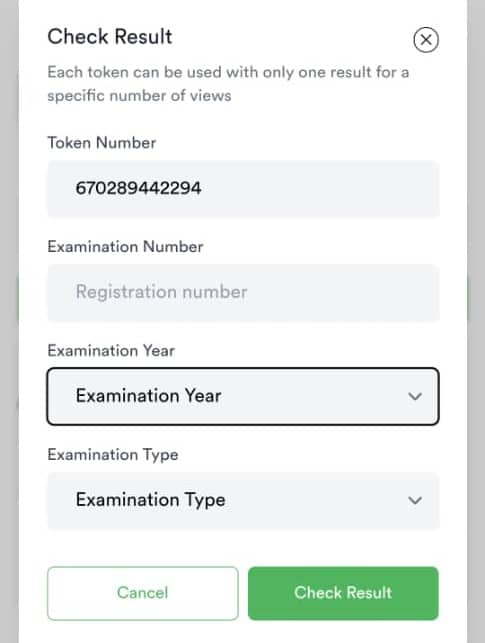
Each token can be used with only one result for a specific number of views

- Click on the Dashboard menu
On the drop-down menu, select “My Token”

- Click on Check Result
Scroll to the right to see the “Check Result” button.

- Enter your exam details to check the result
Type in your examination number and select examination type.


Conclusion
Checking your NECO result with a scratch card and registration number is a straightforward process.
By following the steps outlined in this guide, you can easily access your results and determine your academic performance. Remember to have your scratch card and registration number ready before starting the process.
If you encounter any difficulties or have further questions, don’t hesitate to let me know in the comment box below.
